Tag: htaccess

  • 期待新主页ing

    为了迎接Catt给我设计的个人主页,给blog换了套主题,留下点东西,方便以后用。
    另外欢迎各位亲朋好友留下脚印,方便我收集一下大家的博客链接,我好做Blogroll啊!

    1、关闭Wordpress的修订功能
    在根目录下的wp-config.php中,添加
    [php]define(‘WP_POST_REVISIONS’,false);[/php]

    2、Plugin
    [html]Akismet
    WP-PageNavi
    Google XML Sitemaps
    WordPress Related Posts
    Mail to Commenter
    Twitter Tools
    Syntax Highlighter for WordPress
    bShare 分享
    WordPress Database Backup
    WP-Cumulus[/html]

    3、Google analytics
    [html]
    [/html]

    4、重定向
    [bash]# BEGIN user-defined

    RewriteEngine On
    RewriteBase /
    RewriteCond %{HTTP_USER_AGENT} !^.*(FeedBurner|FeedValidator|feedsky) [NC]
    RewriteCond %{REQUEST_URI} ^/feed.* [NC]
    RewriteRule .* http://feeds.huxuan.org/ [NC,L,R=301]
    [/bash]

    贴一张旧主题的照片纪念一下,地点是GoogleCamp实验室,台式机+笔记本,显示的都是原来主题的效果,拍完了才发现还是挺有感觉的……(如果看不到,我就不多说了,如果有比flickr更好的提供外链图片的网站,尽快告诉我吧!)
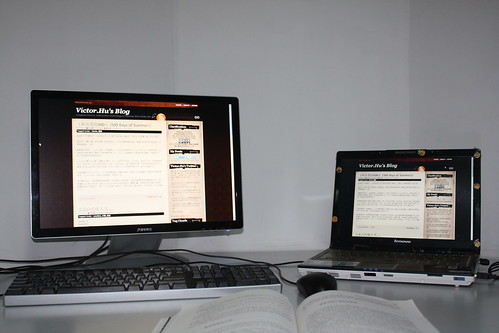
    IMG_5074

  • A recommended kind of RSS solution

    Today I want to recommend a kind of RSS solution and  it’s just what I use for my blog.

    In this way, we will have a permanent and unique rss url. As for me, it’s http://feeds.huxuan.org/huxuan

    1)Sign up as the same name for your feed in FeedSky & FeedBurner.

    e.g. I have
    http://feed.feedsky.com/huxuan for FeedSky &
    http://feeds.feedburner.com/huxuan for FeedBurner
    (I just have it for example, Please don’t subscribe my blog through this two address)

    2) Use the Domain Binding Service which Feedburner & Feedsky both provide to host the feed by your own domain name

    You should choose only one of the two & Feedburner is recommended absolutely
    You need to create a CNAME entry in the DNS records here
    More information are provided by Feedburner & Feedsky when you configure the Domain Binding Service

    3) Change the feed source you didn’t choose in step 2

    e.g. I choose Feedburner to create the feed, so I change the feed source of Feedsky just into http://feeds.huxuan.org/huxuan.

    4)Change the default rss url of wordpress

    In the header.php of theme we use, similar code can be found like this:
    [xml]<link rel=”alternate” type=”application/rss+xml” title=”<?php bloginfo(‘name’); ?> RSS Feed” href=”http://blog.huxuan.org/feed” />[/xml]
    Change the url with underline into the feed you have created.

    5)Change all possible default feed url on the site

    There may be many default feed url list on the site most presenting as a link of an image or some else.
    Just search for it and change it!

    Attention: Some Errors happen in Step 6. Ignore it now.

    6)Redirect the default feed url to the new one just in case

    Insert the code below to .htacess which located in the main directory

    [python]# redirect default feed url to the permanent one
    Redirect /feed http://feeds.huxuan.org/huxuan[/python]

    7)Now all steps is done, just share your unique & permanet feed url to your friends

    if one of the two feed service providers don’t work, just change to the other one via repeating Step 2 & 3

    P.S. If there’s any error or problem, please feel free to inform me of that.